
Every website operator should know whether their website is useful to others. This can be measured through one of the SEO components, backlinks.
The best backlinks are measured by the number of backlinks from websites that have different IP address sources, known as Backlink Referring subnets.
To find out how many subnets are pointing to our website as backlinks, you can find out by using the Majestic tool .
Login to majestic
Access the majestic.com website
Then access the explorer tools https://majestic.com/reports/site-explorer-search
Please request a username and password from the PuTI service desk ticket (specifically for website operators from employees/lecturers).
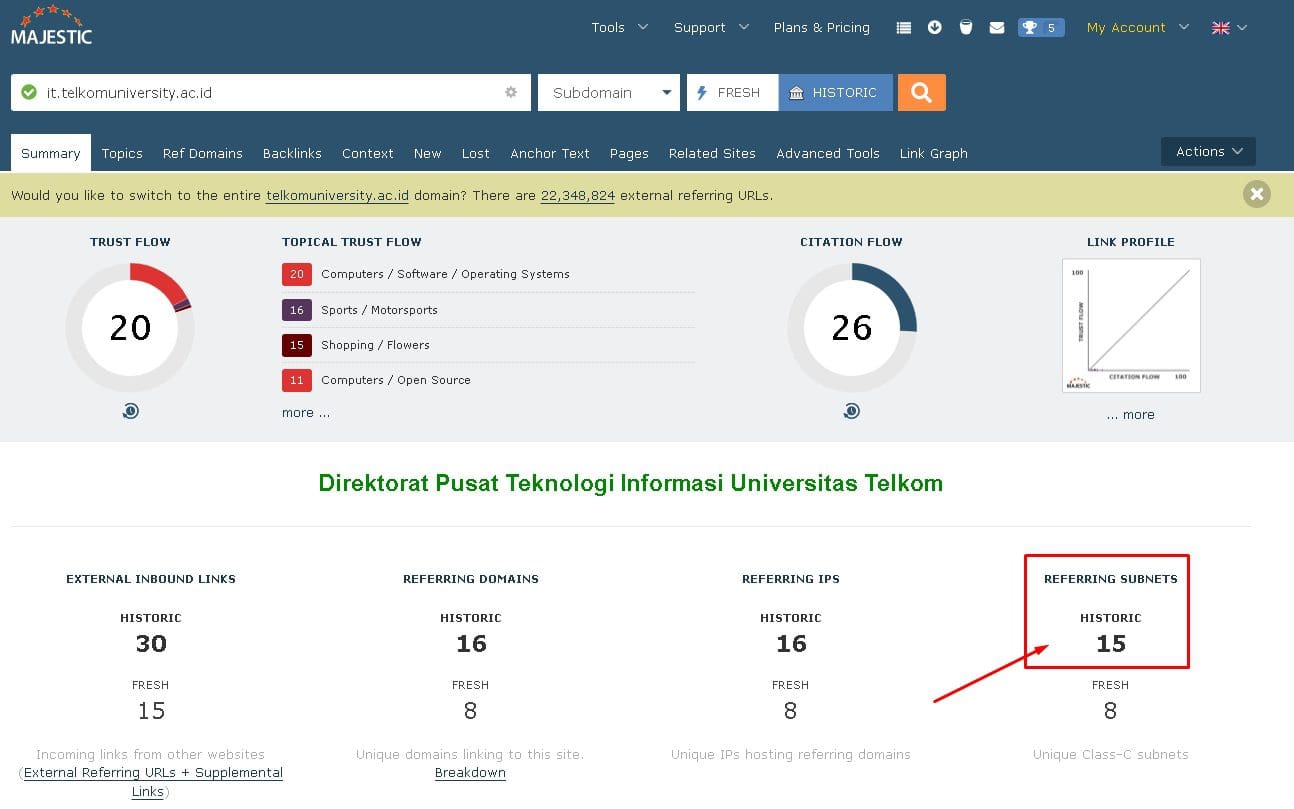
Enter the domain you want to measure

Example: it.telkomuniversity.ac.id
Then select the “Historic” tab
Then click the lens icon
Later you will get a URL like this https://majestic.com/reports/site-explorer?q=it.telkomuniversity.ac.id&oq=it.telkomuniversity.ac.id&IndexDataSource=H
We can edit the subdomain directly in the URL if we want to check other subdomains.
View subnet report
Look at the “Reffering Subnets” Historic section
Historic means a backlink from a different subnet that has been recorded for more than 14 days, while Fresh means a new backlink that is less than 14 days old.
Fresh backlinks can eventually decrease again because they may be deleted by website owners. Historic backlinks, on the other hand, are truly permanent recorded data.
Record the subnet data in Excel OneDrive
This recording is useful so that we know the growth or decline of our website’s backlinks.
Excel Onedrive can be accessed at https://www.office.com/?auth=2 using the SSO account username@telkomuniversity.ac.id