




Learn what a Web Proxy is, how it works, as well as key functions such as improving security, optimizing network performance, and more.
What is Proxy

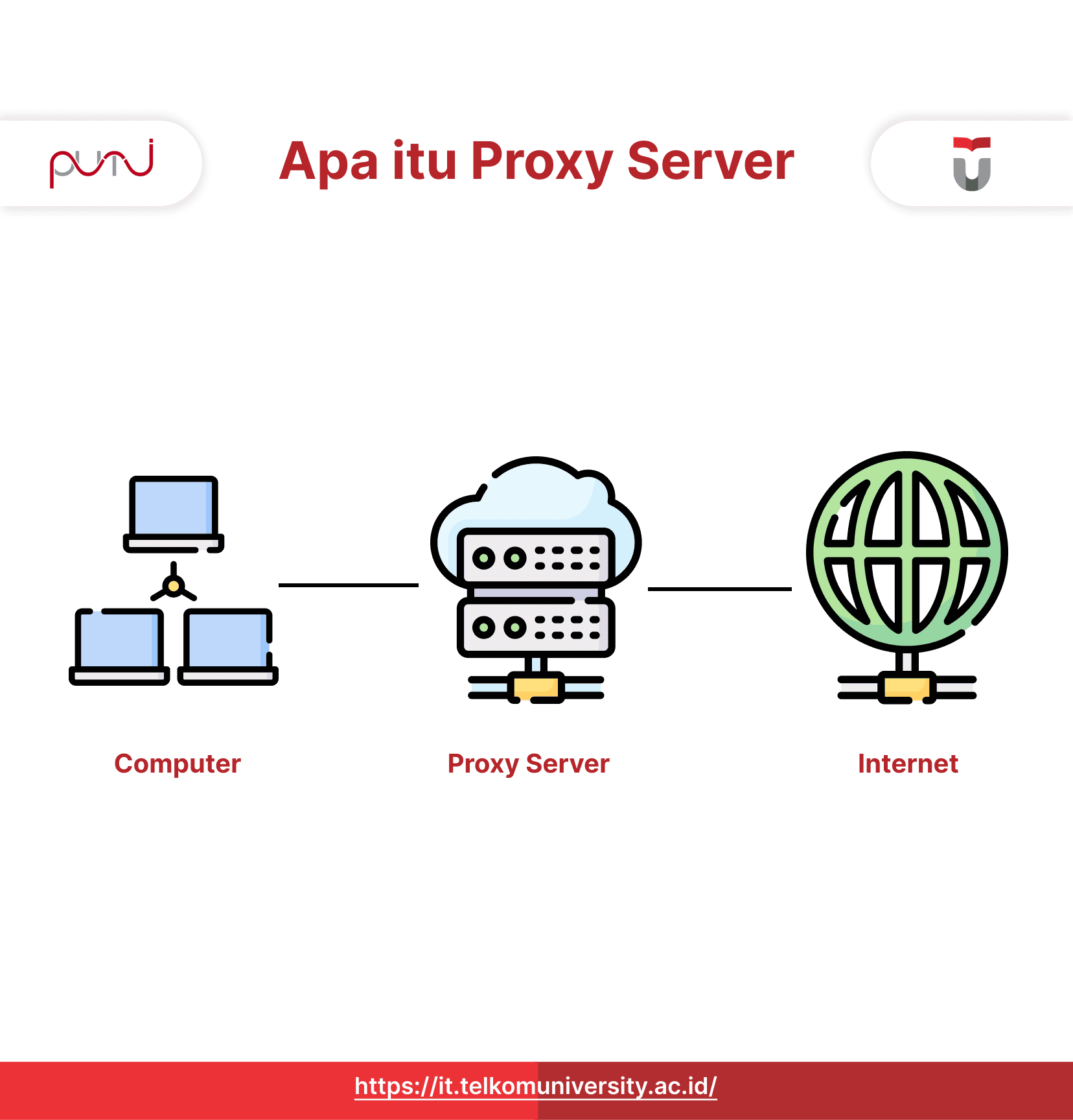
What is Proxy ? Web Proxy, commonly referred to as a Proxy Server, is an intermediary server in a computer network system. A proxy acts as a bridge between the client (user) and the destination server (e.g., web server). The main function of a Web Proxy is to receive requests from clients, forward them to the destination server, and send responses from the destination server back to the client. In this process, the Web Proxycan perform additional tasks such as caching, filtering, and logging.
The way a web proxy works is simple: when you use it, internet requests are sent to the proxy before being forwarded to the final destination. The Web Proxy then receives a response from the destination server and sends the information back to you.
Why would someone use a web proxy? The purpose of using a proxy is primarily related to security and privacy. Since a proxy server can hide the user’s real IP address from the website being visited, users interacting with the internet through a proxy remain anonymous. Additionally, web proxies are usually equipped with encryption to protect the data transmitted between the client and the server.
Functions of a Web Proxy
Here are some of the main functions of a Web Proxy:
Increasing Access Speed
A Web Proxy can store copies of web pages, files, or other objects requested by a client. If the client makes the same request later, the Proxy can retrieve the stored copy instead of fetching it from the destination server. This reduces access time and improves response speed.
Improving Security
A Proxy can act as a firewall, protecting the internal network from external threats such as malware. Proxy Servers can block suspicious or malicious requests and monitor network traffic for potential security threats.
Content Filtering
Proxy Servers can filter content to control or restrict access to specific websites or types of content. This allows network administrators to implement access policies suited to an organization’s needs, such as blocking unproductive or harmful websites.
Securing Privacy
By using a web proxy, users can hide their real IP address when accessing the internet. The Proxy functions as an intermediary between the client and the destination server, preventing the client’s IP address from being visible to the destination server. This helps maintain privacy and anonymity while browsing the internet.
Managing Network Traffic
Web proxy can optimize network traffic by efficiently allocating bandwidth, limiting the number of connections, or setting network usage policies.
Logging and Auditing
Log all requests and responses made through the server. This provides transparency and allows administrators to track and analyze network activity, including internet usage, traffic statistics, and security issues.
A Proxy Server or web proxy can be used in various scenarios, such as in business environments, educational institutions, or even for personal use.
How a Web Proxy Works
The operation of a Web Proxy involves the following steps:
Client Request
When a client (user) makes a request to access a resource, such as a web page, file, or other service, the request is sent to the Proxy. These requests typically use protocols such as HTTP (for web access) or other specialized protocols depending on the type of resource being requested.
Checking Cache
A Proxy Server first checks whether the requested response is already stored in its cache. The cache stores copies of previously accessed resources. If the response is available in the cache and is still valid (not expired), the Proxy directly sends it back to the client without accessing the destination server. This improves response time.
Filtering Requests
If the request is not in the cache or requires direct access to the destination server, the Proxy performs filtering checks. These checks apply various rules and policies set by the network administrator. For instance, the Proxy may verify whether the request is allowed or blocked based on content categories, IP addresses, or predefined rules.
Forwarding Requests
After passing the filtering process, the Proxy forwards the client’s request to the actual destination server using the appropriate protocol (e.g., HTTP).
Receiving Responses
Once the destination server processes the request, it generates a response and sends it back to the Proxy Server. The response may include a web page, file, or other requested data.
Managing Responses
A Proxy can modify the received response before forwarding it to the client. This may include data compression, encryption, or other necessary alterations.
Sending Response to Client
Finally, the Proxy Server sends the response from the destination server back to the client that made the initial request. The client then receives the requested information.
In this process, the Proxy as an intermediary between the client and the destination server, hiding the original client’s identity and performing additional functions such as caching, filtering, and network traffic management. This enhances access speed, improves security, and provides better control over network resources.
Advantages and Disadvantages of a Web Proxy
Advantages
- Improving Network Performance
Improves network performance through caching. When a client requests a cached resource, the Proxy Server provides a quick response without accessing the destination server, reducing response time and minimizing network load. - Saving Bandwidth
Proxy Servers optimize bandwidth usage by compressing data and blocking unwanted or unauthorized content. By reducing data transmission over the network, bandwidth consumption is minimized. - Enhancing Security
A Proxyacts as an intermediary between the client and the destination server. It helps enforce security policies such as filtering harmful content, blocking dangerous websites, and implementing additional safeguards like encrypted traffic.
Disadvantages
- Single Point of Failure (SPOF)
If the Proxy Server fails, all clients relying on it lose internet access. Thus, it is crucial to have a failover mechanism to detect and resolve Proxy Server failures quickly. - Limited Scalability
A high number of connected clients can increase the Proxy workload, potentially reducing its performance and responsiveness. Proper capacity planning is required to ensure the Proxy can handle the necessary number of clients. - Complex Configuration and Administration
Configuring and managing a Proxy can be complicated, especially when dealing with advanced security policies or specialized requirements. A deep understanding of available features is necessary for effective operation.
Types of Web Proxy
Here are some commonly used types of Web Proxy
- HTTP
HTTP Proxy forwards HTTP requests between the client and the destination server. It is the most widely used type of Proxy Server, supporting HTTP protocol. - HTTPS
Specifically designed for HTTPS traffic, this Proxyencrypts data transmitted over HTTPS connections for enhanced security. - FTP
FTP proxy forwards FTP requests between the client and the destination server, allowing users to access FTP servers through the Proxy Server. - SOCKS
SOCKS is a protocol that redirects network traffic. The SOCKS Proxy supports multiple protocols, including HTTP, FTP, and others.
How to Obtain a Proxy
Proxies are categorized into hardware and software proxies. Hardware proxies act as intermediaries between internal networks and the internet, handling data transmission. In contrast, software proxies are hosted by service providers or cloud-based, requiring users to install applications on their computers for interaction.
Software Proxy Costs and Usage
Numerous proxy service providers exist online. It is important to choose a reliable provider that offers proxies suited to your needs. Typically, these proxies require a monthly subscription fee. Some providers offer free versions, but these often come with limitations such as restricted address availability and support for only a few devices. Paid proxies are designed for businesses needing support for multiple devices.
Conclusion
A Web Proxy is an intermediary server that connects clients with destination servers to enhance security, privacy, network performance, and content control. By concealing the user’s real IP address, proxy ensure anonymity and protect transmitted data. Their primary functions include caching, content filtering, and logging activities for monitoring. Proxy are widely used in business, education, and personal environments to maintain a secure and efficient internet connection.
Enhance your expertise in networking technology by studying proxy server at Best Private Universities. Gain in-depth understanding and practical skills from experts. Enroll now and become an expert in networking!
References
https://www.fortinet.com/resources/cyberglossary/proxy-server
Author : Hassan Rizky Putra Sailellah | Editor : Meilina Eka Ayuningtyas
Tags : Kampus Swasta Terbaik di Indonesia | Kampus Swasta di Jakarta | Kampus Swasta di Bandung | Kampus Swasta Terbaik | Kampus Swasta di Surabaya | Universitas Swasta Terbaik di Indonesia | Universitas Swasta di Jakarta | Universitas Swasta di Bandung | Universitas Swasta di Surabaya | Universitas Swasta Terbaik di Jakarta | PTS Terbaik di Indonesia | Universitas Swasta Terbaik | Universitas Terbaik di Bandung