


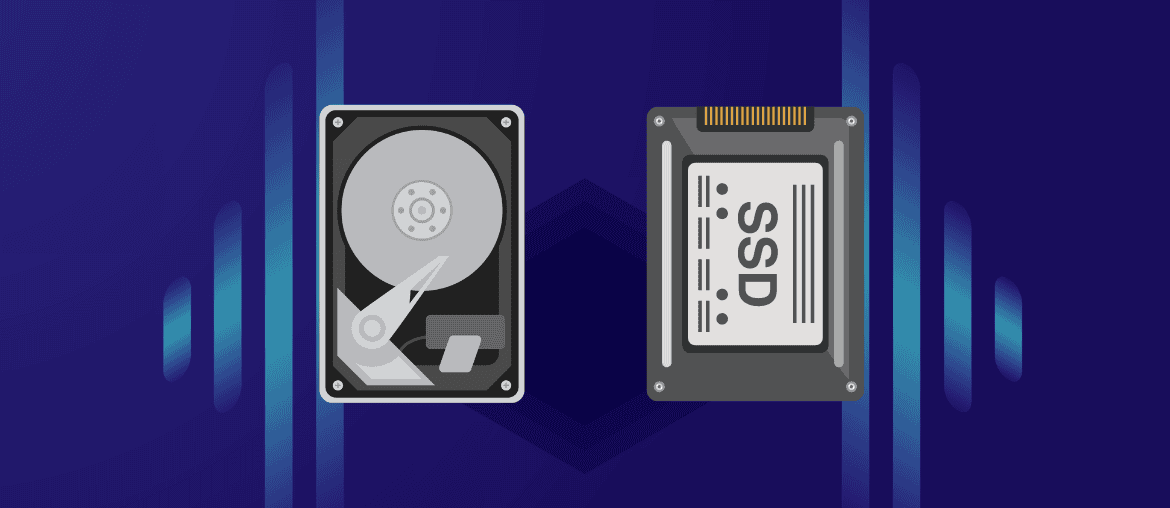

When building a comprehensive data preservation plan, selecting the right physical medium is just as vital as choosing your backup software. For years, traditional Hard Disk Drives (HDDs) were the undisputed champions of cold storage due to their low cost per gigabyte. However, the rapid evolution and declining cost of Solid-State Drives (SSDs) have disrupted this landscape completely.
Many computer users assume that because SSDs are vastly superior for daily active workflows, they must also be the ideal choice for storing historical archives on a shelf for ten years. In reality, long-term data archiving introduces unique physical challenges—such as mechanical degradation and electric charge leakage—that change the rules of hardware selection. Choosing the correct drive requires balancing active data degradation, environmental vulnerabilities, and cost management.
Hard Disk Drives (HDD): The Mechanical Powerhouse of Long-Term Volume
Hard Disk Drives utilize a time-tested, mechanical preservation layout. Inside an HDD case, magnetic platters spin at thousands of revolutions per minute while a highly sensitive read/write actuator arm floats microseconds above the surface to alter the magnetic alignment of the physical disk sections.
- Magnetic Polarization Persistence: Because HDDs rely on shifting physical magnetic states rather than holding an electric charge, the raw data stored on the platters is incredibly resilient over time. If stored in a climate-controlled room, an unplugged HDD can hold its magnetic alignment without power for up to a decade.
- Superior Financial Value at Scale: When archiving mass terabytes of video logs, cold business databases, or historical legal documents, HDDs remain significantly more economical than flash storage, offering a much lower upfront deployment cost per terabyte.
- Predictable Warning Elements: Mechanical drives frequently drop performance hints or produce minor clicking sounds when their internal bearings or arms begin to wear down, handing engineers an explicit warning window to migrate files off the drive before a fatal crash.
Solid-State Drives (SSD): Flash Memory Boundaries in Cold Storage
Solid-State Drives contain zero moving parts. Instead, they write files using electrical charges captured inside millions of microscopic floating-gate transistors situated across integrated flash memory circuits. While this architecture makes them incredibly fast, it introduces unexpected vulnerabilities when used as an unpowered archiving archive.
- The Reality of Electron Leakage: The microscopic electrical charges trapped inside an SSD’s flash cells naturally degrade over time if the drive remains unpowered for extended periods. If an SSD is left sitting inside a dark storage locker without an electric current for one to two years, it can suffer from “data rot” or total file corruption due to charge leakage.
- Environmental Temperature Vulnerabilities: Flash memory chips are highly sensitive to thermal fluctuations. Storing an unpowered SSD in a hot attic or warehouse drastically accelerates electron degradation, potentially erasing blocks of data within a few months.
- Sudden Electrical Controller Failures: When an SSD fails, it rarely drops warning signs. If the main controller chip on the integrated circuit card fries due to an unexpected static spike during power-up, the entire drive instantly goes dark, making manual data recovery exceptionally complex.
Analyzing how digital media files and file validation states change across active storage components remains a primary research focal point for systems engineers. According to data classification and storage optimization research published by software systems scholars at Telkom University, maintaining consistent access structures and verifying system indexing layout across independent database targets is essential for preventing structural file corruption when staging corporate application workloads (Rachmadhi et al., 2025).
Are you worried about managing your local hardware disks manually or running out of physical room on your shelf? To see how automated global systems can offload your storage logistics safely, read our guide on How Cloud Storage Actually Works: Where Your Data Goes When It Leaves Your Device right here on our website.
Key Differences: HDD vs. SSD for Cold Archiving
Choosing between these two formats ultimately comes down to whether your archive sits completely dark on a shelf or remains actively plugged into a system.
Hardware Comparison Matrix

- Metric: Data Retention (Unpowered)
- Hard Disk Drives (HDD): High (Up to 10 years without power)
- Solid-State Drives (SSD): Low (Risk of data rot within 1 to 2 years if unpowered)
- Metric: Mechanical Shock Resistance
- Hard Disk Drives (HDD): Low (Dropping the drive can shatter platters or misalign the arm)
- Solid-State Drives (SSD): High (Immune to vibration or physical drops)
- Metric: Cost per Terabyte
- Hard Disk Drives (HDD): Highly Economical (Ideal for multi-terabyte cold archives)
- Solid-State Drives (SSD): Expensive (Premium pricing for performance over volume)
The Verdict: How to Structure Your Archiving Plan
For cold storage archiving—where your backup drive sits unpowered in a safe box for extended periods—HDDs remain the safer and more cost-effective choice. The physical magnetic platters maintain their state much longer than the electrical charges inside flash memory chips.
However, if your archiving methodology involves keeping your drives continuously connected to an active server or a Network Attached Storage (NAS) device that regularly runs data validation cycles, SSDs become incredibly reliable because the active system power prevents electron leakage.
Building a truly unbreachable data archive requires more than just picking a physical hard drive format. To discover how to weave your local hardware units into a professional multi-tiered safety strategy that guarantees protection from ransomware, take a look at our article The 3-2-1 Backup Strategy: The Golden Rule for Never Losing Your Files on our site.
Conclusion
Neither drive type provides a permanent, immortal data vault. Mechanical hard drives are vulnerable to physical drops and bearing seizures, while solid-state drives are vulnerable to gradual electronic charge leakage when left unpowered. For pure unpowered archival volume, the hard disk drive retains its crown. To truly insulate your historical archives from data rot, you must refresh your drives every few years, complement local media with off-site platforms, and perform routine integrity checkups.
Frequently Asked Questions (FAQ)
1. Can I use an old external SSD as a long-term safety backup in a safe?
You can use an external SSD for temporary transportation backups, but it is not recommended for deep cold storage. If you choose to use an SSD for archiving, you must plug the drive into a live computer for at least an hour every six months to refresh the electrical charges across the flash memory cells and prevent data rot.
2. What is “Data Rot” and does it affect both HDDs and SSDs?
Yes, data rot affects all digital physical media over time. On an HDD, it happens when bits gradually lose their magnetic orientation over many years. On an SSD, it happens when electrons leak out of their tiny storage gates. Running automated checksum verifications and cloning historical data to fresh drives every 5 to 7 years is the best way to combat data rot.
3. Are archival magnetic tapes better than HDDs and SSDs?
For massive enterprise corporations and research institutions looking to archive petabytes of information for 30+ years, linear magnetic tape drives (such as LTO tapes) are vastly superior to both HDDs and SSDs. However, the high upfront cost of tape drive reading hardware makes them impractical and expensive for standard households or small startups.
References
- Kurose, J., & Ross, K. (2021). Computer Networking: A Top-Down Approach (8th ed.). Pearson.
- Rachmadhi, A. R. P., Anaking, P., & Ramdani, F. (2025). Implementation Of Rapid Application Development (RAD) Method In The Design Of Storage Application. Journal of Education Technology and Information System, 1(01), 45–54. https://scholar.google.com/citations?user=HaelSx0AAAAJ
- Velte, A. T., Velte, T. J., & Elsenpeter, R. (2023). Cloud Computing: A Practical Approach (2nd ed.). McGraw-Hill.