





History of Microsoft Outlook
Initially, the Microsoft Office suite did not include Outlook. In 1992, Microsoft released a time management program called Microsoft Schedule for Windows 3.0 and Classic Mac OS, which is considered the predecessor of Microsoft Outlook.
Later, Microsoft Schedule+ was gradually phased out, and most of its features were integrated into Outlook 97, the first version of Microsoft Outlook. Released in January 1997 as part of Office 97, Outlook 97 functioned as an add-on for Microsoft Exchange Server 5.0 and 5.5, incorporating most of the features from Microsoft Schedule+.
It enabled users not only to read emails but also to manage contacts, schedule appointments in a calendar, and add notes to a journal. Microsoft continued to enhance Outlook by releasing Outlook 98, which addressed newer internet standards such as HTML, followed by Outlook 2000 (bundled with Exchange 2000 Server) and Outlook 2002 (included in Office XP).
Outlook 2003, released in November 2003, marked a significant milestone in Outlook’s development. It remained both a component of Office 2003 and a standalone application. This version introduced substantial improvements, including a better email experience, calendar sharing, enhanced view settings, full Unicode support, search folders, colored flags, cached Exchange mode, and more. Additionally, Outlook 2003 improved junk email filtering with more up-to-date spam definitions.
With the release of Office 2007, Microsoft introduced the revolutionary Ribbon User Interface (UI). Outlook 2007 adopted the Ribbon UI in sub-windows such as message, appointment, and contact windows while retaining the classic menu and toolbar in the main interface. This version introduced several useful features, including attachment previews, SMS and text messaging support, contact sharing, exporting calendars as HTML files, and exporting items as PDF or XPS files.
Building upon previous versions, Outlook 2010 became even more advanced. It supported multiple Exchange accounts within a single profile, improved conversation views by grouping related emails across folders, and introduced intelligent reminders when sending emails without a subject line. Quick Steps were also added to allow users to perform multiple actions with a single click.
In addition, Outlook 2010 introduced a Social Connector to integrate social networking services, enabled contacts to schedule meetings, and added visual indicators for meeting conflicts and unanswered meeting requests. The Ribbon UI was fully implemented in Outlook’s main interface starting with this version.
Outlook 2013, released in January 2013, introduced a new visual design for scheduled tasks, attachment reminders, and Outlook data file compression. Outlook 2016 added the ability to create, open, edit, and save files directly in the cloud, along with the Tell Me search feature. Outlook 2019 became the latest version available at the time.
Functions of Microsoft Outlook
Microsoft Outlook is an email and personal information management application developed by Microsoft Corporation. Its primary functions include:
Email Management
Outlook allows users to send, receive, and manage emails from multiple email accounts. Users can organize folders, compose messages, flag important emails, create email rules, and search through their inbox efficiently.
Calendar
Outlook provides a comprehensive calendar feature that allows users to schedule and manage their activities. Users can create events, set reminders, share calendars with others, and organize meetings or invitations via email.
You May Also Like : Understanding VoIP Technology and Its History
Contacts
Outlook enables users to store and manage contact information, including names, addresses, phone numbers, and email addresses. It also supports integration with online contact services such as Microsoft Exchange Server.
Tasks and Notes
Outlook includes tools for managing tasks and notes. Users can create task lists, set priorities, assign deadlines, and categorize tasks. The notes feature allows users to quickly record important information.
File Management
Outlook allows users to store and manage email attachments. Users can attach files to outgoing emails and access files received in incoming messages. Search and folder management features make organizing files more convenient.
Advantages and Disadvantages of Microsoft Outlook
As one of the most popular email and information management services, Microsoft Outlook offers numerous benefits. However, there are also some limitations to consider.
Advantages of Microsoft Outlook
1. User-Friendly Interface
Outlook features a clean, simple, and intuitive interface. Even first-time users can quickly learn how to use the platform, especially for sending and managing emails.
2. Strong Security Features
Outlook offers a variety of security features, including account activity monitoring, message authentication, encryption, spam protection, and phishing detection.
3. Social Media Integration and Smartphone Synchronization
Through its Social Connector feature, Outlook can be linked with social media accounts. Users can also synchronize Outlook with smartphones, allowing access to emails and schedules anytime and anywhere.
4. Folder Organization
Users can create folders to organize emails based on categories. Important emails can be stored in dedicated folders, making them easier to locate and keeping the inbox organized.
Disadvantages of Microsoft Outlook
1. Limited Storage in the Free Version
The free version of Outlook provides only 5 GB of storage space. Users who require larger storage capacities must upgrade to premium plans, which offer up to 1 TB of storage.
2. Less Popular in Indonesia
Many Indonesian users are more familiar with Gmail or Yahoo Mail because of their widespread usage. As a result, first-time Outlook users may need time to adapt to its interface and features.
| Microsoft Outlook Advantages | Microsoft Outlook Disadvantages |
|---|---|
| User-Friendly Interface | Limited Storage Capacity in the Free Version |
| Robust Security Features | Less Popular in Indonesia |
| Social Media Connectivity and Smartphone Synchronization | Limited Storage and Advanced Features |
| Efficient Folder Management | Performance and Synchronization Limitations (Mac/Desktop) |
Similar Products
There are several alternatives to Microsoft Outlook that users can consider depending on their needs and preferences. Some of the most popular options include:
1. Mozilla Thunderbird
Mozilla Thunderbird is an open-source email client known for its reliability in sending and receiving emails. Its simple interface, easy setup process, and stable performance make it one of the best alternatives to Microsoft Outlook.
2. Zimbra
Zimbra is a widely used open-source platform for building mail servers. In addition to its server solutions, Zimbra also offers an open-source email client that serves as a strong alternative to Microsoft Outlook. Zimbra’s email client is available on Windows, Mac, and Linux operating systems.
3. Claws Mail
Claws Mail is one of the most popular open-source email clients, particularly among Linux users. It offers a rich set of features, including advanced editing tools, email filtering, and support for external plugins. Besides Linux, Claws Mail is also available for Windows and Mac, providing consistent performance across multiple platforms.
Microsoft Outlook Usage Tutorial
After understanding the functions and features available in Microsoft Outlook, the next step is learning how to use it effectively. Below is a simple guide for sending an email using Outlook:
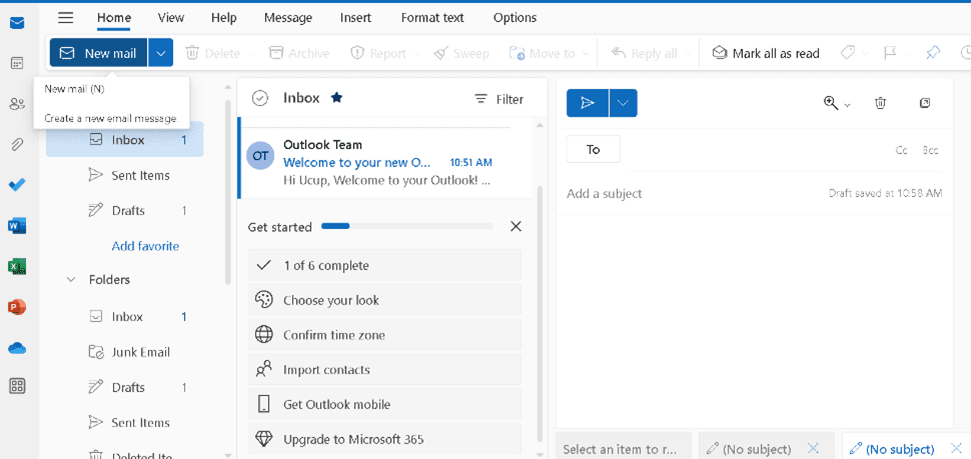
Step 1
Click the “New Email” or “Compose Email” button to create a new message.
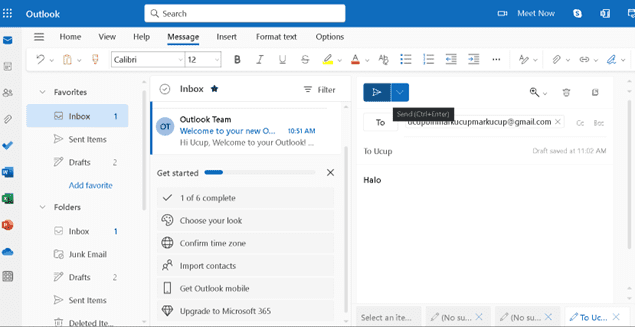
Step 2
Enter the recipient’s email address, write the subject line and message content, then click the “Send” button to deliver your email.
With these simple steps, users can easily communicate through Microsoft Outlook and take advantage of its various email management features.
Conclusion
Microsoft Outlook is one of the most popular and widely used email applications in the world. With its intuitive interface and comprehensive functionality, Outlook enables users to manage multiple email accounts from various service providers, including Microsoft Exchange, Microsoft 365, Gmail, Yahoo Mail, and many others. Users can easily send, receive, and organize their emails within a single integrated platform.
In addition to email management, Outlook provides a powerful calendar feature that allows users to schedule appointments, organize meetings, and share calendars with others. Its advanced search functionality also makes it easy to quickly locate emails, contacts, notes, and other important information.
One of Outlook’s key strengths is its seamless integration with other Microsoft products. Users can access and edit Microsoft Word, Excel, and PowerPoint documents directly within Outlook, enabling a smoother workflow without constantly switching between applications.
Furthermore, Outlook includes robust security features. Spam filtering and phishing detection help protect users from online threats while safeguarding personal and organizational data. Thanks to its reliability, extensive features, and strong security capabilities, Microsoft Outlook continues to be a preferred choice for both individuals and organizations seeking efficient communication and schedule management solutions.
If you are interested in learning more about communication technologies such as Microsoft Outlook and their role in the digital transformation of organizations, the Information Systems Study Program at Telkom University provides students with knowledge in system management, data governance, and technology implementation in modern business environments. It is an excellent opportunity to become part of the next generation of digital professionals ready to face the challenges of the industry.
References
- ExtendOffice. (n.d.). Outlook history tutorial. ExtendOffice. https://id.extendoffice.com/132-outlook-tutorials/outlook-tutorials-get-started/6028-outlook-history.html
- Pengertianku. (2021). What is Microsoft Outlook? Pengertianku. https://www.pengertianku.net/2021/05/microsoft-outlook-adalah.html
Author : PuTI